
Sensor Framework Architecture
The Sensor Framework for QNX SDP is middleware for building automotive, robotics, or other embedded systems. This QNX Software Development Platform (SDP) add-on component provides many features to support multiple camera and sensor types (e.g., CSI2 cameras, ONVIF cameras, lidar, radar) and multiple platforms (e.g., Renesas V3H, NXP iMX8QM). In brief, the Sensor Framework helps you to develop applications that use cameras and sensors.
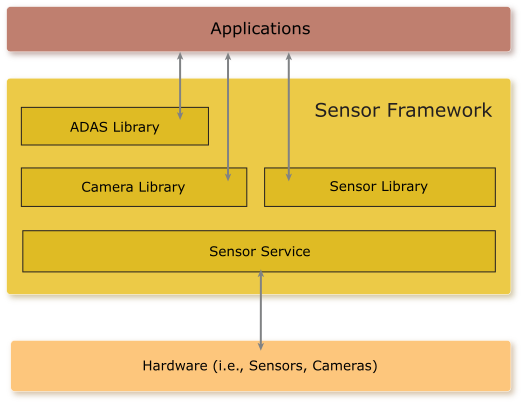
- Sensor service
- C-based APIs in the ADAS, Camera, and Sensor libraries
- Playback and recording
- Data visualization
- Camera and sensor drivers
The Sensor service takes care of loading the configuration for the sensors and cameras that you want to use on your system. You can modify the sensor configuration file so that the service recognizes the sensors and cameras connected to the target board. There is also an interim data configuration file available. This latter file lets you identify the data units that correspond to interim data from your sensors and cameras. The Sensor service also allows you to play prerecorded video.
- ADAS library
- This library allows applications to visualize data using viewers and algorithms through API functions and a configuration file. The JSON-formatted configuration file indicates how you intend to use the ADAS library and initializes the viewers and algorithms specified in this file. The ADAS library also lets you perform synchronized recording from all configured sensors. For more information, see the ADAS Library Developer's Guide.
- Camera library
- This library simplifies the process of interfacing with cameras connected to your system. You can use the Camera library to build applications to stream live video, record video, and encode video. Encoding and recording is available as H.264 (MP4 file container) or uncompressed (MOV file container or proprietary UCV). For more information, see the Camera Developer's Guide.
- Sensor library
- Using this library, applications can access all sensors that are available through the Sensor Framework. In the context of the Sensor library, a sensor can be any one of a camera, lidar, radar, IMU, or GPS system. The library allows you to record sensor data in either proprietary uncompressed format or using lossless compression (GZIP/LZ4 formats). For more information, see the Sensor Developer's Guide.
Playback and recording capabilities are primarily for development and demonstrative usage, but do allow you to capture data for a sensor (in the form of a data file) or video for a camera. This is useful because you can use the data file or video to test your applications.
The data visualization capabilities of the Sensor Framework
permit you to take data from sensors and cameras and create representations
of what is seen
. This feature helps you to
develop and test your applications because you have visual
representations of what is detected by the connected sensors and cameras.
These data visualizations can include video with overlays for detected objects and
point cloud representations of the objects detected by various sensors.
For example, on a display, lidar firings can show up as points while
data from other sensors show up as boxes.
The Sensor Framework provides sample applications that demonstrate vision-processing algorithms
that you can use in your own applications. For more information about the vision-processing support,
see the Reference image vision-processing support
section in the Getting Started with the Sensor Framework guide.
Camera and sensor drivers are provided with the Sensor Framework to support specific device types. For a list of the supported hardware, see the Getting Started with the Sensor Framework guide and the Getting Started guide for any hardware platform you plan to use. If a certain camera or sensor driver that you need isn't supported, you can contact BlackBerry QNX for help to write a custom driver. Or, you can integrate the device by using an API provided in the Camera or Sensor library.