
The HHBSP framework
The hypervisor host BSP (HHBSP) provides a convenient framework for building reference QNX hypervisor systems.
This framework provides buildfiles and scripts that demonstrate one way of configuring the QNX hypervisor, and allows you to quickly build a bootable image that you can run on target boards for evaluating the product. However, the resulting image has a limited set of demo-like functionality that might not be useful in a production system, and might not work on all of your intended target platforms. For example, the image doesn't work on x86 systems booting with the legacy BIOS instead of UEFI; the latter mode is the only one supported by the HHBSP.
When you're ready to go ahead with product development, you should no longer use the
HHBSP framework but instead adapt an existing BSP to support your hypervisor system,
as explained in Build a hypervisor based on a BSP
.
Download the HHBSP
The HHBSP board-agnostic framework (or BSP wrapper) is available from the QNX Software Center. If you want to use the HHBSP framework to build a QNX hypervisor system:
Download the appropriate HHBSP from the QNX Software Center. For the non-safety QNX Hypervisor product, HHBSP archives are named according to the following pattern:
BSP_hypervisor-host_br-710_be-710_SVNrev_JBNbuild
where rev is the revision number, and build is the build number.- Unpack your HHBSP archive to your workspace; for example, ~/qnx710/bsp/.
For up-to-date information about HHBSPs, see the Release Notes for your QNX hypervisor package.
The HHBSP and board-specific BSPs
The HHBSP is architecture- and board-agnostic; it works on any supported board. The only board-specific components the HHBSP includes are some buildfiles.
Thus, after you have your HHBSP on your development host, you must download the
board-specific BSP for your target board (e.g., the BSP for the Renesas R-Car H3)
and place it in a convenient location. The default location is inside the HHBSP, in
the images/host_bsp/ directory, but you can use another
location as long as you set up your build environment accordingly (see Configuring an HHBSP build
in this chapter).
The descriptions below assume you are using the HHBSP and the default locations for the board-specific BSP for the host, and for the architecture-specific BSPs for the QNX guests.
Contents of an HHBSP
- the board-specific BSP for the target board of the hypervisor host
- the BSPs for the guests
- the build and configuration files required to build the hosts and the guests
- a directory structure where you can place the host BSP and the guest BPSs so that you can use a single make command to build the host, bring in the prebuilt guest files, and, if required, build the board-specific BSPs
- the source code files and the prebuilt binary for shmem-host, the host portion of the shmem-* demo application; you can download the guest portion (shmem-guest) separately in the guest BSP from the QNX Software Center
- the source code files for the virtual watchdog devices (wdt-sp805 for ARM and wdt-ib700 for x86)
- in the images/ directory, scripts, buildfiles, makefiles,
etc. that allow you to build a hypervisor host, provided an appropriate
board-specific BSP is installed in a location referenced by the
BOARD_SPECIFIC_BSP_LOCATION variable (see
Configuring an HHBSP build
) - a configuration file: configure.mk, where you must specify your target board, and where you may modify the locations of your host board-specific BSPs
- in the images/disk_config/ directory, configuration files, which you can use to configure the disk image you will transfer to your target board
- a generated/ directory, where the build process puts files it generates, including the final buildfiles it used to create the IFSs, so you can review them if you need to troubleshoot the build
Structure of an HHBSP
The figure below shows the HHBSP directory structure after the host BSP and the guest BSPs have been added to the default locations. Not all directories and files are shown; the diagram shows only the directories and files most relevant to building a hypervisor system.
When you have an HHBSP in your working directory, you will have there a typical QNX BSP directory structure, which will include the following:
- HHBSP root directory
- This directory has the standard BSP directories of images, install, prebuilt, and src. It also has a Makefile, a source.xml file identifying the package (for the QNX Software Center), and a readme file (readme.txt) with information to identify the BSP.
The HHBSP is a framework. If you are using the default directories, you must place the board-specific BSP in the host_bsp/ directory, and the BSPs for any guest you will use in a directory you specify in the guest_data/ directory.
If you are using the default directories, you only need to specify the board
type. If you are placing your host BSP in a non-default location, you
must configure variables to point to it (either your environment variables
through the command line, or the make variables by editing the
configure.mk configuration file; see Specify the component locations
in this chapter).
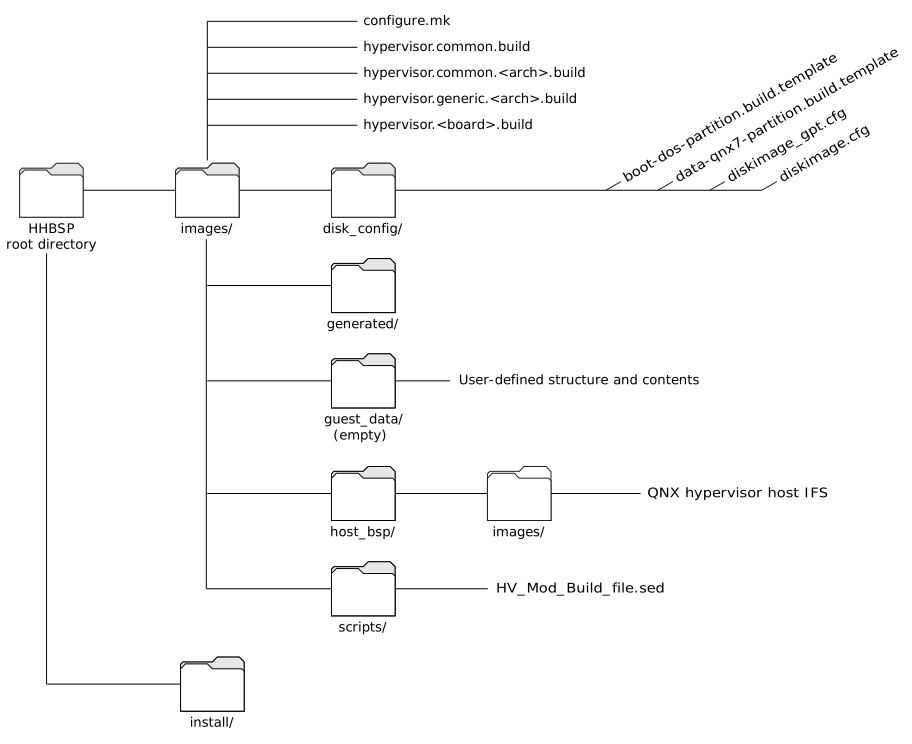
Assuming that you are using the default locations, the images/ directory includes:
- disk_config
- A directory with the diskimage*.cfg and the *.partition.build.template files, which you can use to adjust the partition sizes in your disk image, and the contents of the filesystem in the image; for example, to speed up the boot time.
- generated
- Initially empty, this directory is a repository for files (e.g., the final buildfiles: hypervisor_FINAL_*.build), generated by the build.
- guest_data
- An empty directory where you can create subdirectories for each guest BSP (e.g., qnx710/, linux/).
- host_bsp
- The host BSP directory. Extract the board-specific BSP for your hypervisor host into this directory. This BSP is the standard QNX SDP 7.1 BSP used for the board.
- hypervisor-*.build files
- The hypervisor-common.build file has build instructions common to all architectures and boards.
- scripts
- A directory with the HV_mod_Build_file*.sed scripts
that modify buildfiles in the board-specific BSP directory to produce final,
board-specific buildfiles for each each IFS that will be built
(see
How the build uses the buildfiles
in this chapter).
Remember:
- The directories inside the host_bsp/ directory are added only after you bring in the relevant BSPs.
- If you plan to change the board BSP buildfiles for your hypervisor host, make the changes in images/host_bsp/images/. Don't make the changes to the generated buildfiles in the generated/ directory, as these will be overwritten when you run your build.
For more information about the structure of QNX BSPs, see Building Embedded Systems in the QNX Neutrino documentation.
Location of the IFSs after a build
When you run make to build your hypervisor system, the build places the following in the images/ directory:
- a bootable disk image called hypervisor.diskimage with IFSs for the hypervisor host in the bootable partition
- a data partition with IFSs for the guests, as well as miscellaneous system files not needed at boot time; you can move files (e.g., buildfiles) out of the IFS to this partition to speed up the boot time
For more information, see Building in the HHBSP
in this
chapter.