
Sensor Library Overview
The Sensor library provides applications with a consistent interface to simultaneously access up to 64 sensors connected to the hardware platform.
Overview
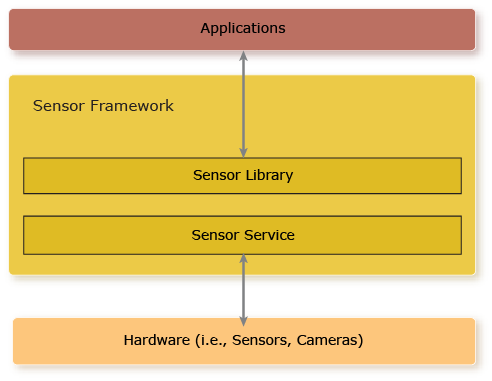
- receiving streaming data from a sensor
- recording sensor data to a file
- receiving status events from a sensor
- publishing interim data to the Sensor Framework that can be consumed by subscribers
- subscribing to the Sensor Framework to receive interim data from publishers
Sensor configuration
The sensors that are available to your application is based on a static configuration file that the Sensor service loads once on its startup.
For more information, see the
Sensor configuration file
section in the System Services guide.
If you're using a camera specifically, and need to change its settings dynamically, then you need to use the Camera library instead. See the Camera Developer's Guide.
Interim data configuration
The interim data units that are used for interim data are based on a static configuration file that the Sensor service loads once on its startup.
For more information, see the
Interim data configuration file
section in the System Services guide.
Using the Sensor API
Most sensor applications follow a similar workflow:
- Open a connection to the logical sensor or interim data unit.
- Register callback functions or events to receive sensor and interim data and status.
- Start the sensor or interim data unit to stream data.
-
While sensor is streaming, your application may:
- access sensor (or interim) data or status (e.g., handle sensor events that you've registered for)
- record sensor or interim data
- subscribe or publish interim data
- Stop the sensor or interim data unit from streaming data.
- Close the connection to the sensor or interim data unit.
For more information about the API, see the Sensor Library Reference chapter.