
Framework architecture
The Shared Input framework enables guests running in virtual machines (VMs) to access input from devices connected to a QNX Hypervisor host.
This chapter assumes that you are already familiar with the concepts presented in the following documentation:
- QNX Hypervisor User's Guide
- The virtualization frameworks architecture
A standard mechanism
The input framework implements section 5.8 of the VirtIO 1.1 specification, which defines an extensible, platform-independent approach to creating virtual input devices. The framework provides a virtual device (vdev), virtio-input, that provides the functionality of one or more physical input devices and that works with standard VirtIO input drivers for hypervisor guests.
The virtio-input vdev enables input device sharing with guests and supports input from the following device types:
- USB keyboard
- USB pointer
- Mouse with scroll wheel and buttons
- Touch
- Single- or multi-touch input
Input sharing
The host manages all interactions between guests and physical input devices:
- The hypervisor host owns the physical input devices and runs drivers for those devices.
- If the guest in a VM requires access to input, the VM presents the virtio-input vdev to the guest and the guest runs a VirtIO input driver to interact with the vdev.
- To communicate with each other, the guest driver and the vdev use virtqueues, which serve as the standard mechanism for bulk data transport on VirtIO devices.
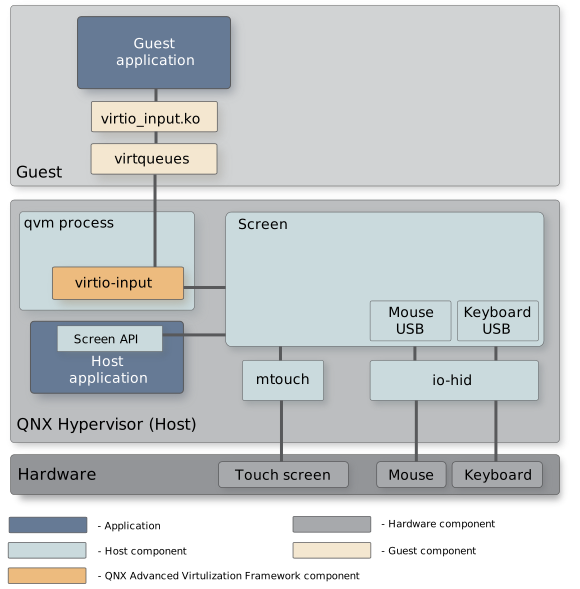
Devicesin the
Understanding QNX Virtual Environmentschapter of the QNX Hypervisor User's Guide.
The life of an input event
As the above diagram illustrates, the virtio-input vdev works with the QNX Screen Graphics Subsystem—simply known as Screen—to manage access to input events.
Here's a typical example of how the framework processes an input event:
-
An instance of Screen running on the host receives the event.
Typically, an input event occurs when the user interacts with a physical device. In some cases, however, an application generates an input event programatically, by calling Screen's screen_inject_event() function.
Note:To learn more about Screen and how it manages input, see the Screen Developer's Guide. -
The virtio-input vdev gets the input event from Screen.
You can configure the vdev to control which event types it will provide to the guest; see
vdev virtio-input
in this chapter. -
The virtio-input vdev maps the event to the equivalent Linux input event code, then writes the mapped event into a virtqueue.
The virtio-input vdev maps the pointer (mouse) and keyboard events that it receives from Screen into Linux input-event codes (see https://www.kernel.org/doc/Documentation/input/event-codes.txt). For touch events that it receives, the vdev maps them into a series of events defined by the multi-touch (MT) protocol. This protocol is used both for touch hardware that supports single-touch only (type A) and for hardware that supports multi-touch (type B); see https://www.kernel.org/doc/Documentation/input/multi-touch-protocol.txt for details. For type B hardware, the vdev supports a two-touch minimum and a maximum of five fingers.
The Linux input-event code is written into a virtqueue, which serves as the communication channel between the vdev and the guest driver.
-
The guest driver reads the content of the virtqueue buffers. In the guest, the driver passes the event directly into user space to the application interested in the event. Any guest applications must be designed to work with Linux input-event codes to process pointer and keyboard events.