
Framework architecture
The Shared Filesystem framework (or virtual filesystem framework) enables guests running in virtual machines (VMs) to access files in directories shared by the QNX Hypervisor host.
This chapter assumes that you are already familiar with the concepts presented in the following documentation:
- QNX Hypervisor User's Guide
- The virtualization frameworks architecture
The framework provides a virtual device (vdev), virtio-fs, that gives guest applications access to host directories through a virtual filesystem. The vdev follows a design that's not part of any VirtIO specification but rather, is part of a separate open-source project in the Linux, QEMU, FUSE, and Kata Containers communities. For more information, see https://virtio-fs.gitlab.io/design.html. Our vdev is compatible with a wide range of Linux kernel versions.
A filesystem based on virtio-fs provides local filesystem semantics to the guest, allows multiple guests to share the same mountpoint, and takes advantage of running VMs on the same machine by providing fast coherency.
Filesystem sharing
The host manages all interactions between guests and shared directories in its own local filesystem:
- The hypervisor host owns the physical devices that store directories that it can share, and interacts with their contents (files) through POSIX calls to its local filesystem.
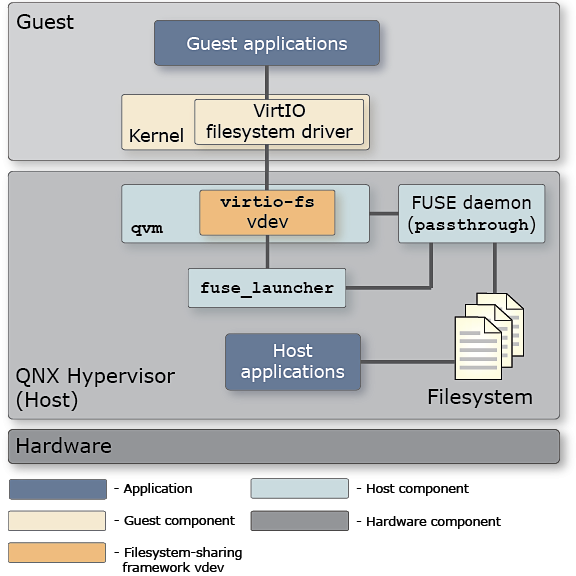
- If the guest in a VM requires access to certain host directories, the VM presents the virtio-fs vdev to the guest and the guest runs a VirtIO filesystem driver to interact with the vdev.
- The vdev configuration names the specific host directory that will be shared with the guest. To share multiple host directories, you can specify distinct virtio-fs vdev instances, with one for each directory to be shared.
- To communicate with each other, the guest driver and the vdev use virtqueues, which are the standard mechanism for bulk data transport on VirtIO devices.
Devicesin the
Understanding QNX Virtual Environmentschapter of the QNX Hypervisor User's Guide.
Filesystem virtualization
The virtual filesystem framework makes the sharing of host directories transparent to applications in the guest and in the host. At startup, the guest issues a mount command to make a shared host directory appear at a certain place in the local (guest) filesystem. When guest applications access a file at that mountpoint, the guest OS recognizes an attempt to access the virtual filesystem and sends a request to the VirtIO filesystem driver. The driver encapsulates the request using the Filesystem in USErspace (FUSE) protocol. This is a well-known protocol upon which virtio-fs is based.
FUSE requests are sent to the virtio-fs vdev using virtqueues (which aren't shown in the diagram for compactness). On the host, the vdev then sends these requests to the FUSE daemon, which interprets the FUSE protocol message and works with the host filesystem to carry out the corresponding operation. When the operation completes, the daemon sends the results to the vdev, which passes them back to the guest, via virtqueues. Our FUSE daemon is based on FUSE protocol version 3.9.
On the host, at startup, the vdev uses a helper utility outside of the VM, fuse_launcher, to launch the FUSE daemon. The vdev passes some of its configuration options to fuse_launcher so it can run the daemon with the desired settings of which host directory to share and whether to enable direct I/O. After it launches the daemon successfully, fuse_launcher shuts down.
The daemon service is called passthrough because it mirrors or passes through the host filesystem to the guest. Although the mountpoint chosen by the guest is independent of the path of the shared host directory, the contents of this mountpoint—its files and sub-directories—look exactly the same as they do on the host. Guest applications don't need extra permissions to access these files; if they can access the mountpoint, they can access the host directory files.
Host applications aren't even aware that a given directory is being accessed by guest applications. They can use POSIX filesystem calls to perform reads, writes, etc., on local files, as usual. Although, any updates to this directory's files made by guest applications will be seen by host applications.
Editing the Android configuration to ensure mount succeeds
Operation not supported on transport endpoint.fs_use_xattr virtiofs u:object_r:labeledfs:s0;Regular file attributes are supported by our implementation of virtio-fs; just extended attributes aren't.