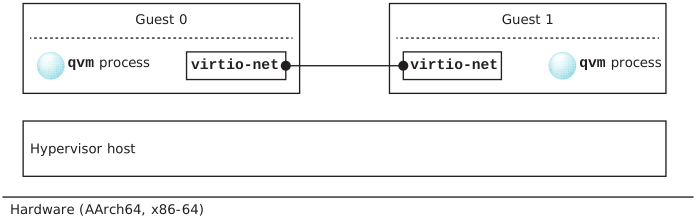
This section describes a configuration for virtio-net vdevs used to
establish communication between guests.
The figure below illustrates the peer-to-peer connection with a virtio-net vdev
in each guest that would result from the configuration described below.
Figure 1Guest-to-guest communication using virtio-net vdevs as peer nodes in each
guest.
To configure virtio-net vdevs in two guests to establish communication between them,
guests specify the name option (see Common vdev options in the
Virtual Device Reference chapter) to
have a peer vdev appear under
/dev/qvm/system_name/vdev_name.
Here, system_name is the value you gave to the
system option and vdev_name is the name of the
peer vdev (e.g., /dev/qvm/qnx71-x86_64-guest/virtio-net_0).
When you use the virtio-net vdev's peer option, the full name of the
end of the peer link is formed from the value of system_name
concatenated with the value of the virtio-net vdev's
name option. Thus, in the qvm configuration
files for two QNX guests, you might have, for Guest 0:
system qnx71-x86_64-guest
		vdev virtio-net
		mac 56:4d:51:ae:23:0e
		name curly
		peer /dev/qvm/qnx71-x86_64-guest/moe
where /dev/qvm/qnx71-x86_64-guest/moe points to Guest 1, and, for Guest 1:
system qnx71-x86_64-guest
		vdev virtio-net
		mac 56:4d:51:87:3d:ac
		name moe
		peer /dev/qvm/qnx71-x86_64-guest/curly
where /dev/qvm/qnx71-x86_64-guest/curly points to Guest 0.
With these configurations, on the host the peer vdevs would appear as follows: