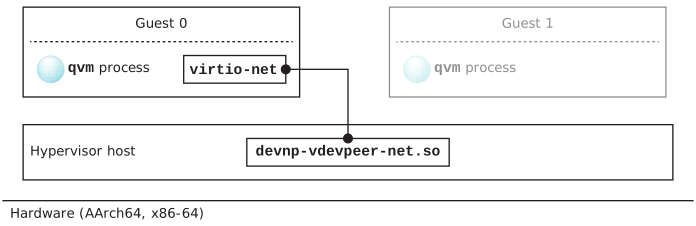
This section describes a configuration for a virtio-net vdev
in a guest communicating with a network driver in the hypervisor host.
The figure below illustrates a peer-to-peer connection between the virtio-net vdev
in a guest and the devnp-vdevpeer-net.soio-pkt-* driver in the hypervisor host.
Figure 1Guest-to-host communication between a virtio-net vdev and a peer node
provided by the devnp-vdevpeer-net.so driver.
Configure a virtio-net vdev
The following excerpt shows the virtio-net vdev configuration in the
*.qvmconf file for the VM hosting the guest.
For a QNX guest on an ARM board, configure a virtio-net vdev as follows:
system qnx71-arm-guest
...
# The loc and intr gic options are for ARM only. The guest will see the
# virtio-net vdev as a memory-mapped I/O device at the specified location.

vdev virtio-net
	loc 0x1c0c0000
	intr gic:40
	mac aa:aa:aa:aa:aa:aa
	name p2p
	peer /dev/vdevpeers/vp0
	peerfeats 0x3
where:
qnx71-arm-guest
The system name of the VM for the guest (see the system option
for more details), also specified by the second last token in the
vdevpeer-netpeer option
(peer=/dev/qvm/qnx71-arm-guest/p2p).
The path to a virtio-net vdev in the guest, inside the
/dev/qvm/ directory. The remainder of the path is
specified by the virtio-net vdev system
option for the guest's directory (qnx71-arm-guest), and
inside this directory, the node in the guest, specifed by the vdev's
name option (p2p).
bind=host_node_path
The path to the node in the host, inside the
/dev/vdevpeers/ directory. In this case the default
prefix vp is used for node zero
(vp0).
mac=host_mac_address
The MAC address for the node in the hypervisor host.
Enable the interface
This subsection provides instructions for enabling the interface.
Suppose that you have already enabled an interface on the host, for example,
as follows:
ifconfig vp0 up
ifconfig vp0 192.168.1.1
where vp0 is the peer-to-peer interface on the host, and
192.168.1.1 is its address.
You must now enable the interface on the guest and assign it a static IP address in
the same subnet as the host. For example, for a QNX guest:
ifconfig vt0 192.168.1.2
where vt0 is the name of the interface on the guest, and
192.168.1.2 is an address in the same subnet as the host.
For a Linux guest:
sudo ifconfig enp0s3f0 up
sudo ifconfig enp0s3f0 192.168.1.2
where enp0s3f0 is the peer-to-peer interface, and
192.168.1.2 is an address in the same subnet as the host.
Note:
If peerfeats bit 1 (one) is set for the peer interface on the
guest, you must ensure that the checksum settings for the interface on the
host match those for the interface on the guest. For example, to disable
checksums for TCP and UDP on the node, configure it as follows:
The guest sees network interfaces with vt or enp
prefixes. It isn't aware of any peer naming, so you must define how a
vt and enp interface is mapped to a peer. MAC
addresses provide confirmation of the mapping.