This section describes a configuration for a guest communicating with the outside
world through network drivers in the hypervisor host.
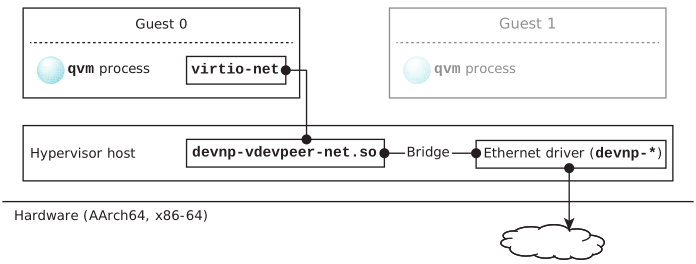
The figure below illustrates guest-to-world communication using a virtio-net vdev in
the guest and a devnp-vdevpeer-net.so driver in the hypervisor
host connected via a bridge to an Ethernet driver also in the host.
Figure 1Guest-to-world communication with a virtio-net vdev in the guest connected
to a devnp-vdevpeer-net.so driver connected via a bridge to
an Ethernet driver in the host.
Configure a virtio-net vdev
In the configuration for the VM hosting the guest, configure a virtio-net vdev
so you can establish peer-to-peer communication with the devnp-vdevpeer-net.so driver.
For example, for a QNX guest on an ARM board:
system qnx71-arm-guest
...
# The loc and intr gic options are for ARM only. The guest will see the
# virtio-net vdev as a memory-mapped I/O device at the specified location.

vdev virtio-net
	loc 0x1c0c0000
	intr gic:40
	mac aa:aa:aa:aa:aa:aa
	name p2p
	peer /dev/vdevpeers/vp0
This is exactly like the virtio-net vdev configuration in Guest-to-host.
Enable services in the host
In the host, you must start io-pkt-*, specifying the
devnp-vdevpeer-net.so driver, start the internet services
(inetd), then create a bridge. For example:
Note the -d ravb mac=126ce901562c option for
io-pkt-v6-hc, which starts the driver
for Renesas RAVB Ethernet interfaces needed to connect to the outside world.
Add the interface to the bridge in the host
You must then add the devnp-vdevpeer-net.so interface to the
bridge in the host. For example:
ifconfig vp0 up
brconfig bridge0 add vp0
Finally, use the bridge in the host to connect the
devnp-vdevpeer-net.so node to the Ethernet driver in the host
(see Acting as a bridge in the QNX Neutrino
Core Networking Stack User's Guide and brconfig in the Utilities Reference).